Free tool
Remove Duplicates From a List, Online
Paste a list below and get back a clean version with every duplicate removed — case sensitivity and whitespace handling are yours to control, and nothing leaves your browser.
Your list
One item per lineHow the duplicates remover works
Paste a list with repeated entries into the box above. Turn on Case sensitiveif “ABC-1” and “abc-1” should count as different items, keep Trim spaces on to avoid trailing whitespace hiding a real match, and click Remove duplicates. The first occurrence of each item is kept; every later repeat is dropped.
Duplicates within a list vs. duplicates between two lists
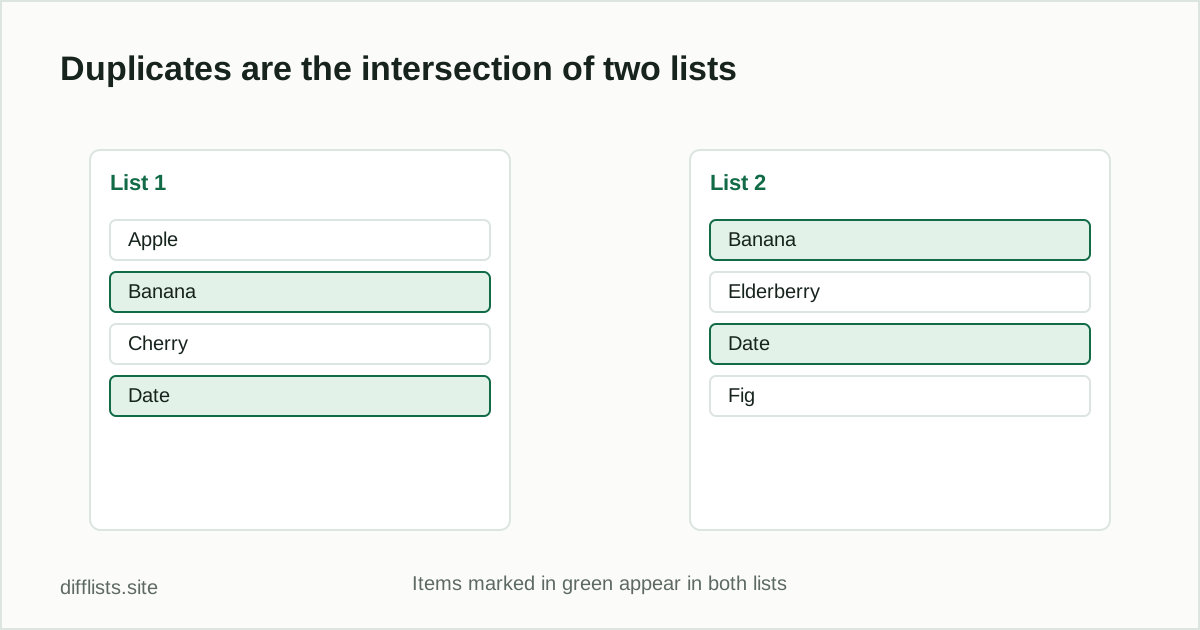
This tool removes repeats within a single list. If instead you want to know which items are duplicated across two separate lists— say, last month’s export and this month’s — that’s the intersection of the two lists, which the full comparison tool calculates directly. See finding duplicates between two lists for the full walkthrough of both cases.
Common sources of hidden duplicates
- Trailing or leading whitespace that makes an identical-looking entry fail to match.
- Inconsistent capitalization across an export pulled from two different systems.
- Blank lines that get counted as items unless ignored.
If your list also has hidden zero-width or non-breaking-space characters that look invisible but break matching, run it through the invisible character detector first.
Common uses for a duplicates remover
- Cleaning a mailing or contact list: remove repeated entries before an import or a send.
- Merged spreadsheet exports: when two sheets or tabs get pasted together, duplicates often follow.
- Tag and keyword lists: deduplicate a set of tags, labels, or keywords collected from multiple sources.
- Guest lists and RSVPs: catch the same name entered twice across different sign-up forms.
- Inventory or asset tags: flag accidental duplicate entries before a stock count.
How “first occurrence wins” matters
When two entries are considered duplicates, this tool keeps the first one it sees and discards the rest — including their exact capitalization and spacing. If your list has “Apple” followed later by “apple”, the result keeps “Apple”. If the casing of the kept version matters to you, put your preferred version first, or sort the list with the alphabetizer before deduplicating so you can control which variant appears.
Everything runs locally in your browser tab — the list you paste is never uploaded to a server, which matters if you’re cleaning a customer list, an internal export, or anything else you’d rather not send to a third party just to remove a few repeated rows.
Duplicates remover vs. spreadsheet “Remove Duplicates”
Excel and Google Sheets both have a built-in Remove Duplicates feature, which works well when the data is already in a spreadsheet and you want the cleanup to happen in place. This tool is the faster option when you only have plain text — a pasted list, a script’s output, or an export that isn’t in a spreadsheet at all — and don’t want to open one just to deduplicate a short list. Both approaches use the same underlying idea: keep one copy of each distinct value and discard the rest.
One difference worth knowing: spreadsheet dedupe tools are usually case-sensitive by default, treating “Apple” and “apple” as different values unless you add a helper column to normalize case first. This tool defaults to case-insensitive matching instead, which better matches how most people think about duplicates — toggle case sensitivity on if your list genuinely needs to treat different capitalizations as distinct entries.
There’s also no formula to maintain afterward: a spreadsheet dedupe is a one-time action on the current data, but if you re-paste an updated export later, you just run this tool again on the fresh list rather than reapplying a saved formula or macro. That makes it a good fit for a recurring cleanup step rather than a one-off spreadsheet fix.
How do I remove duplicates from a list online?
Paste your list into the box above, choose case-sensitivity and whitespace settings, and click Remove duplicates.
What counts as a duplicate by default?
By default matching is case-insensitive and trims whitespace, so "Item" and "item " count as the same value.
Does this tool tell me how many duplicates were removed?
Yes, the result panel shows exactly how many duplicate entries were found and removed.
Can I remove duplicates between two separate lists instead of within one?
That's a different operation — paste each list into the main comparison tool and read the Intersection result, which shows items duplicated across both lists.
Does it work on delimited lists, not just one-item-per-line?
Yes, it auto-detects comma, semicolon, tab, and pipe delimiters in addition to newline-separated lists.
Is there a size limit for the list I can clean?
No hard limit — everything runs in your browser tab, so lists with tens of thousands of items are fine, though extremely large pastes may take a moment.